
Google Chrome will be able to check spelling in multiple languages simultaneously in the near future. Thus it can boost our productivity in communicating online everywhere.
According to Google Chrome official blog, it has updated a new version 45.0.2453.0 of the Chrome Dev channel, which became available in the log.
“The dev channel has been updated to 45.0.2453.0 for Windows, Mac, and Linux. A partial list of changes is available in the log,” said in its blog.
“In an email from Julius Alexander IV, the developer at Google spearheading this functionality’s completion, Alexander says that “only the UI portion of this feature is done for now,” so clicking the UI buttons in the right-click menu to switch between languages won’t actually change the language used by Chrome for spellchecking. He also added that there’s no plan for it to ever work on Mac OS X because Chrome on OS X uses the operating system’s system-wide spellchecking tool, not the one built natively into Chrome,” reported in 9to5google.
Currently in Chrome, Spell check can work only in one language at a time. But if we use more than one language in our work, we have to manually select the language which needs spellcheck. To do this, we have to change the Chrome language settings so that it allows us to add language based on our preference. The below image illustrates the spell check by right clicking on the mouse and select the language.
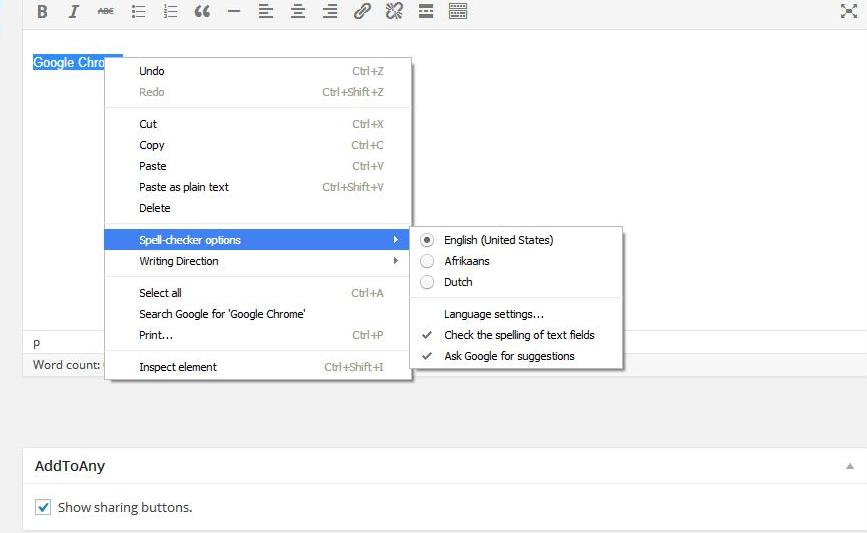
Once you install this new version, you have to turn on the feature by going to chrome://flags page and clicking the enable button under “Enable Multilingual Spellchecker.” From there, you can go to chrome://settings/languages and add multiple languages, or adjust the spell-checking options in the right-click menu. Note that the feature works only on Windows, Linux, and Chrome OS.
But in latest dev version, it allows us to select more than one language at a time. When we right click on the mouse, we will see the new update like this below.

Have you seen both English and German selected in the Spell-checker options? Thus by using this multilingual spell check update, Chrome will check the spelling of any languages entered into the text fields.
